In private development. Waitlist open.

A chief of staff for your whole life.

Goose connects your work, your home, and the things you need to remember. It keeps track of commitments, prepares the next step, and brings everything together through one assistant, running on your Mac, with the AI you choose.

Your context. Your AI. Your control.

One email when it's ready. Nothing else. Privacy
$20/year. AI usage billed separately by your provider. Mac mini not included.See Goose in action ↓
Today
Goose
Calendar
Tasks2
Coding
Research
Memory
Home
Your Mac miniHosting · screen locked
Today
Morning brief · 7:00
Your follow-ups are ready. The 3:30 clash with school pickup is handled, and the house is set for the evening at 6. That ambitious to-do list still needs a word.
Waiting on you
Follow-up to Maya about the proposal
Kestrel Works · from your 11:48 pm capture
Review
Unlock the front door for the cleaner at 10
Home · needs your confirmation
Review
Draft a follow-up to Maya about the proposal using today's meeting notes.
Drafted from the Kestrel account with this morning's Granola notes. Her thread mentions a discount you never approved, so I left it out and flagged it.
Waiting for approval
Send as ops@kestrel.example to Maya Lind
Approve and sendEdit

A day with Goose

One assistant for your companies, your clients, your projects and the rest of your life. Each action uses the right account and context.

Morning

Start the day with the whole picture.

Goose brings together your calendar, important conversations, unfinished commitments, and the work it prepared overnight. See what changed, what matters today, and what needs your decision.

After a meeting

The meeting ends. The follow-through starts.

Goose connects meeting notes from tools like Granola to the conversations and projects they belong to, tracks your commitments, and prepares the follow-up. You review the important actions while Goose keeps the details together.

Away from a screen

Keep the thought. Keep moving.

Speak a thought into Pebble Index 01 or capture it through Goose on your phone. Goose keeps the context and turns the next step into something you can act on. How capture works

Your AI. Your choice.

Choose OpenAI, Anthropic, or another compatible hosted provider. Run a model on your own hardware. Or use different models for different kinds of work. Goose keeps your memory, tasks, and permissions together as your choice of AI changes.

Hosted AI

Your provider, your account

Connect OpenAI, Anthropic or another compatible hosted provider with your own account.

  • Usage is billed directly by that provider
  • Keys stay in your Mac's Keychain
  • Spending limits per job, per day and per month
Local AI

A model on your own hardware

Run compatible models on your own machines so model inference stays local.

  • No per-request provider bill
  • Hardware requirements depend on the model
  • Works alongside everything else Goose does
A combination

The right model for each job

Choose models for chat, delegated work and background reading, balancing capability, location and cost.

  • Keep private notes on a local model
  • Send the hardest problems to a hosted one
  • Switch any of them in Settings

Change the model. Keep your context.

It remembers, and it follows through.

Goose becomes more useful the longer you use it, and it keeps work moving between conversations.

Memory you can inspect, correct, and control

Goose remembers useful context from the information you connect and the things you tell it. See where a fact came from, correct what changed, and control what Goose keeps using. What it learns about your preferences comes with Undo, and permission changes always stay with you.

A conversation starts the work

Goose keeps track of what still needs to happen: the next step, the person you are waiting on, and the context you will need when you return.

One view across work and life

Keep work, clients, projects, and personal life in one view. Goose connects the context for you and keeps the right account and role attached to each action. Run several companies, or just one busy life.

A little personality. A clear sense of when to get serious.

Goose is playful with you and professional with everyone else.

“Your follow-ups are ready. The calendar conflict is handled. That ambitious to-do list still needs a word. HONK”

Say “Peaches” and it drops the jokes and works the problem with its strongest model until you confirm it is fixed.

At home on your Mac. With you on your iPhone.

Your Mac hosts Goose and keeps the work moving. Your iPhone is where you talk to it, capture a thought, see what changed, and approve the next step. Use the Mac app to install, connect, manage, and update your personal system.

Talk to it
Hold to speak. Speech is turned into text on the phone itself.
Away from home
Reach your Mac securely from anywhere, with notifications that carry no content.
When the host is out of reach
What you write is saved and queued, then delivered once your Mac is reachable.
Always on, screen locked
The host stays powered and awake; its display can sleep and its screen stays locked.
9:41
Saturday, November 8
Today
Morning brief · 7:00
Three meetings, one moved. Two drafts waiting on you. Dentist at 1:30, and your sister's birthday is Thursday.
Waiting on you
Send reply to Mara re: Q4 budget
Kestrel Works · expires in 6h
Review
Text Ana about Thursday dinner
Personal · from your number
Review
Agenda
9:30
Kestrel weekly sync
Prep ready
11:00
Workout
Kept free by your rule
1:30
Dentist
Harbor Dental
4:30
Call with Oren Pike
Today
Goose
Work
Home
More
9:41
Goose
Ask Ana if Thursday dinner still works, and remind me to book the dentist follow-up.
Reminder set for tomorrow at 9. Here is the text to Ana. It goes from your number once you approve it.
Waiting for approval
Message to Ana, from you
“Still good for dinner Thursday? I can do 7.”
Approve and sendEdit
Message Goose
Today
Goose
Work
Home
More
Research and documents

Give Goose the project, not just the question.

Ask Goose to compare options, research a decision, prepare a briefing, or work through a spreadsheet and presentation. Follow the progress, answer the questions that need you, and keep the finished work with its context.

Coding workforce

Put your coding agents to work.

Give Goose a spec, coordinate Claude Code, Codex, and Pi across your machines, and follow the work from your phone. See progress, answer questions, and review the changes before they move forward.

Your assistant. Your decisions.

Goose prepares the work and makes the next step clear. You review outgoing messages and consequential actions, see which account is involved, and can inspect what happened afterward.

Approve the exact thing
Each approval shows the action, the account, the recipient and the content. Change a word and it asks again.
Lines it will not cross
No payments, no deleting at the source, no public posts.
One button stops everything
STOP blocks every outside action on every device until you resume.

Where your information goes

GooseOS keeps its working memory, records, and credentials on your Mac. When you use hosted AI, the context needed for a request goes to your chosen provider under your account. Connected services exchange data when you use them. Local models keep model inference on your own hardware.

Where Goose keeps its stateOn your Mac: memory, records, drafts, approvals and credentials, with encrypted backups to storage you choose.
Where hosted AI processes a requestAt the provider you selected, using only the context supplied for that request, under your account.
What changes with local modelsModel inference stays on your own hardware.
Whether connected services exchange dataYes. Mail, calendars, Slack and Home Assistant exchange data when you use them.
Who approves important actionsYou. Outgoing messages and consequential actions wait for your approval.

Your hardware. Your history. Your choice of AI.

Turn your smart home into an intelligent home.

Connect Goose to Home Assistant and bring your home into the same assistant that understands your day. Ask about your home's state, control connected devices, and coordinate routines around your schedule and preferences.

“I'm starting a meeting.”
Goose turns on your office scene and quiets the house for the call.
“Get the house ready for the evening.”
Lights, climate and scenes settle the way you like them.
“Is the front door locked?”
Goose checks the lock and tells you what it actually reports.
Your day sets the routine
A calendar event or your instruction starts, or proposes, a routine you have allowed.

You choose the devices and routines Goose can control. Sensitive actions, such as unlocking a door, require your confirmation. Home features use compatible devices connected through Home Assistant, and they are optional.

Capture a thought. Give Goose the next step.

Press the button on Pebble Index 01 and speak a note or request. Your capture reaches Goose through the Pebble app, where it becomes useful context, a task, or work prepared for your review.

  1. You press and speak
    “Draft a follow-up to Maya about the proposal using today's meeting notes.”
  2. Goose keeps the context
    The capture is saved and linked to Maya's thread and this morning's meeting.
  3. The work is ready
    A task and a draft wait for you in Goose.
  4. You approve
    The message goes out from the right account once you say so.

Say it at 11:48 at night; find it prepared at 7 in the morning. The ring is for capture only: you read, review and approve in Goose on your phone or Mac.

Optional accessory. Pebble Index 01 is sold separately.
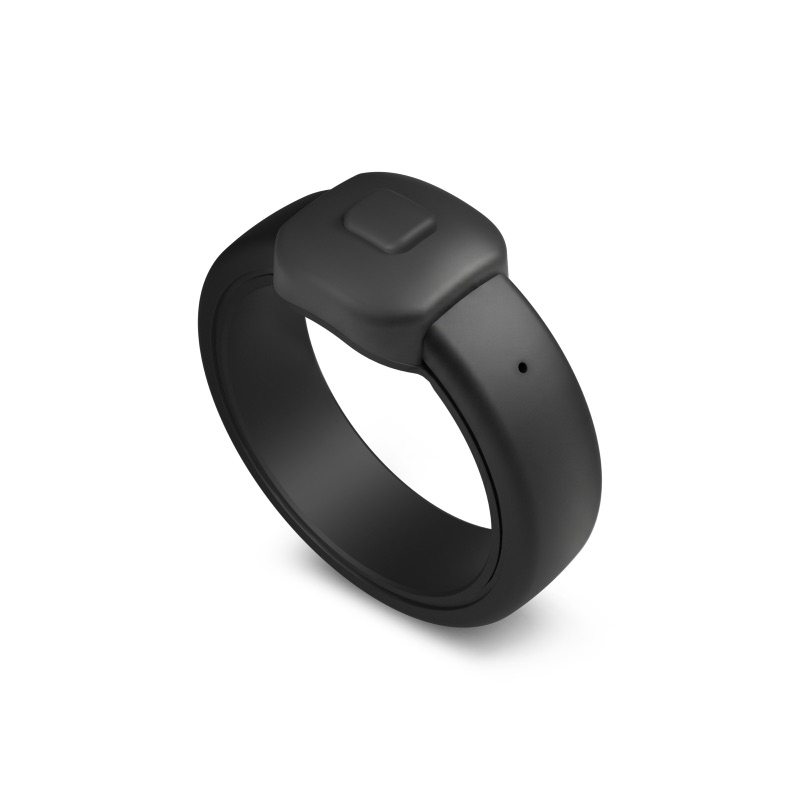
Pebble Index 01, a matte black ring with a single button on top
Pebble Index 01. Image: Pebble.

Why GooseOS

A persistent personal system

It runs on hardware you control and keeps building context about your life and work.

Model choice with continuity

Change providers or go local without losing memory, tasks or history.

Work, life and home in one place

One assistant across your companies, your errands and your house.

Capture from anywhere

Your phone and Pebble Index 01 turn passing thoughts into prepared work.

Clear permissions and a record

You approve what goes out, and you can see what ran and why.

Native on Mac and iPhone

Manage the system on your Mac; live with it on your phone.

Guided setup on the Mac you choose.

  1. Install Goose on the Mac that will host it.
    The app guides setup and manages the components it needs. No command line.
  2. Connect your AI and accounts.
    Choose providers, connect the tools you use, and set permissions.
  3. Bring Goose with you.
    Pair your iPhone and other Macs. Add Home Assistant and Pebble Index 01 if you like.

You will need a supported Apple silicon Mac on a current macOS that can stay on, and either a hosted AI account or a model you run yourself.

Pricing

One annual price for GooseOS. Choose your AI provider and pay that provider for the usage you need.

GooseOS
$20/year

AI usage is billed separately and directly by your chosen provider. Mac mini and other hardware are not included.

One license per host. Your own devices connect to it.

Join the waitlist
What GooseOS costs and what is paid separately
CostHow it works
GooseOS software$20/year
Hosted AI usageAdditional, billed directly by the provider you choose
Mac mini or another hostPurchased separately
Pebble Index 01Optional accessory, purchased separately
Home devices and other servicesTheir own hardware, subscription or usage costs apply

Questions

What does $20/year include?
The GooseOS software license for one year: the Mac app that hosts Goose and the apps you use with it. One license per host. Your own devices connect to it. AI usage and hardware are separate.
Do I need Claude?
No. Use OpenAI, Anthropic, another compatible hosted provider, a compatible local model, or a mix.
How is AI usage billed?
Directly by the provider you choose, under your own account. The $20/year does not include AI usage credits.
Is my existing AI chat subscription enough?
Usually not on its own. Goose connects to a provider's developer access, which is typically billed separately from a consumer chat plan. Check your provider's terms.
Do I need a Mac mini?
You need a supported Apple silicon Mac that can stay on to host Goose. A Mac mini makes a natural dedicated host, but any supported Mac works. Hardware is not included.
Does all of the AI run on my Mac?
Goose and your records always live on your Mac. Where the model runs depends on your choice: at a hosted provider, on your own hardware, or both.
Do I need Home Assistant or the ring?
No. Both are optional. They extend Goose into your home and into screen-free capture.
How does Pebble Index 01 connect?
Press the ring's button and speak. The recording goes through the Pebble app on your phone and on to Goose. See the official Index 01 page for the device itself.
Can Goose send messages or control the house without me?
Goose runs the routines you have allowed. Outgoing messages and sensitive actions, like unlocking a door, wait for your approval.
What happens if the host is unavailable?
Your devices show what they have and queue what you write. Anything that needs the host runs once it is reachable again.
What happens if I replace the Mac?
Goose backs up continuously and encrypted to storage you choose. Restore onto the new Mac with your recovery key, review what changed, and carry on.
When can I get GooseOS?
It is in private development and there is no release date yet. Join the waitlist and you will hear first.

Get in line for the first release.

In private development. Waitlist open. When GooseOS is ready, the waitlist hears before anyone else.

$20/year. AI usage billed separately by your provider. Mac mini not included.

Where would Goose live? Optional
One email when it's ready. Nothing else. Privacy